All services

A B2B procurement platform for your trade customers

Each with their own price list, credit limit and order history. Your sales team stops retyping orders from e-mails, and customers place them at any hour - nights and weekends included.

  • Customer price listsprices and discounts per account
  • Credit limitspayment terms enforced by the system
  • Bulk orderingfile import, templates, approvals
  • ERP integrationtwo-way sync with your ERP

See the B2B platform from the inside

Customer catalogue

Every customer sees their own prices and stock

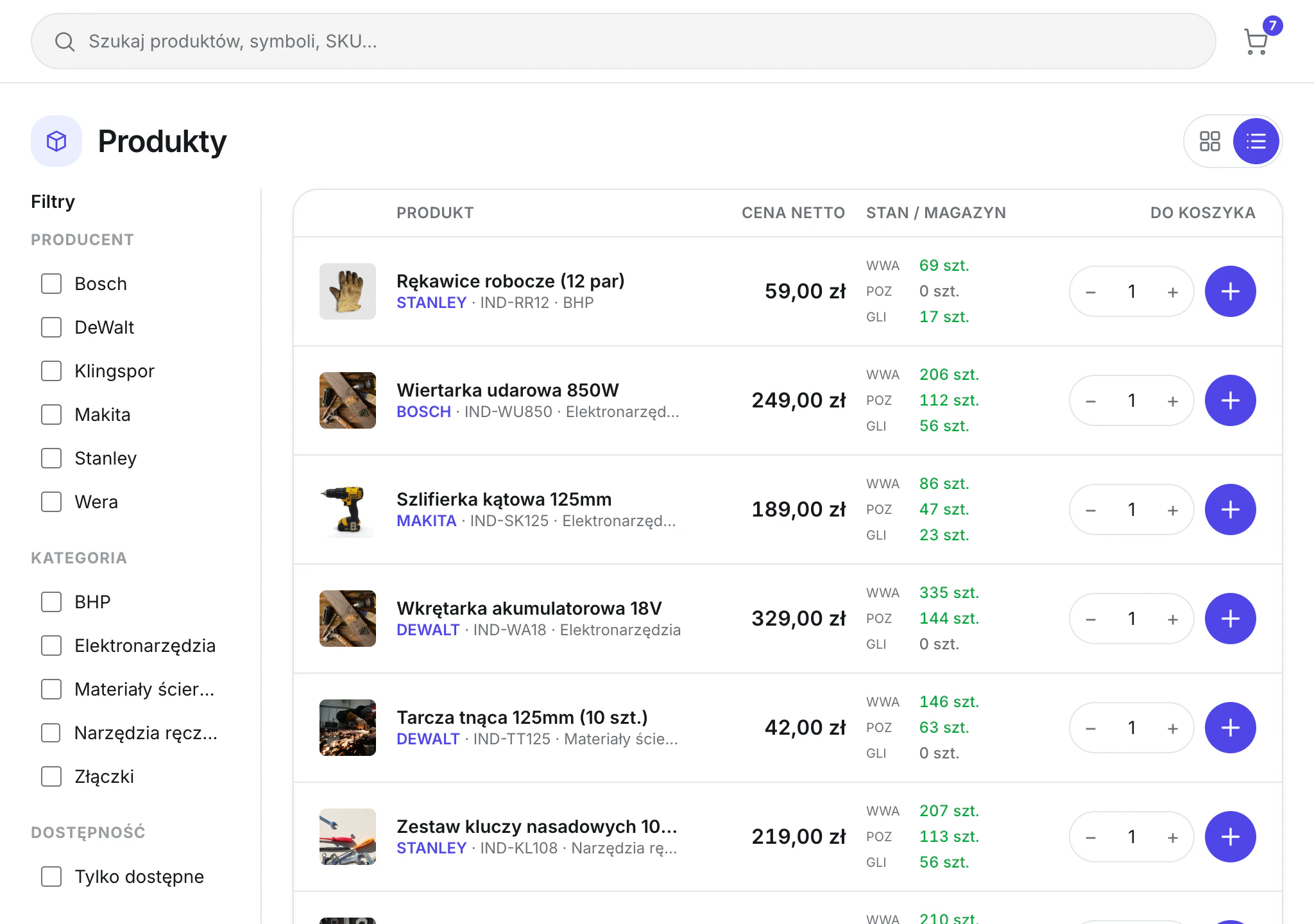
After signing in, a trade customer gets the catalogue priced with their own discount and stock for every warehouse. They search by name, SKU or brand and add items straight from the list, without asking a sales rep for a price.

  • Net price after the customer discount
  • Stock split by warehouse
  • Search by SKU and filters
  • Photo, brand and SKU on every line
Product catalogue in the customer panel with net prices and stock in three warehouses
Customer dashboard

The credit limit always in view

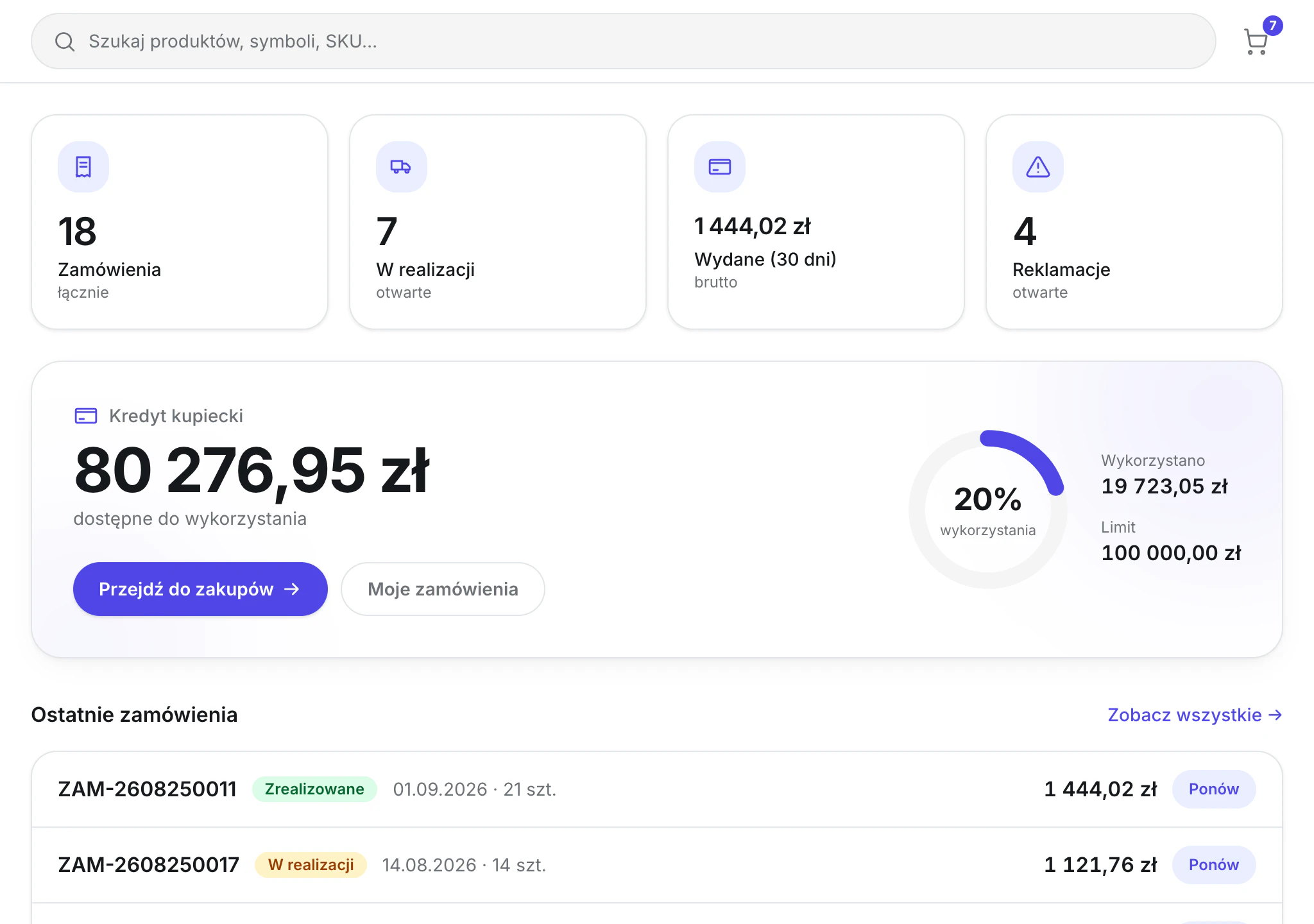
The customer sees how much trade credit is left, what they spent this past month and what is being fulfilled.

  • Available limit and usage
  • Orders in progress and complaints
Customer dashboard with available trade credit, limit usage and recent orders
Bulk ordering

A large order uploaded from a file

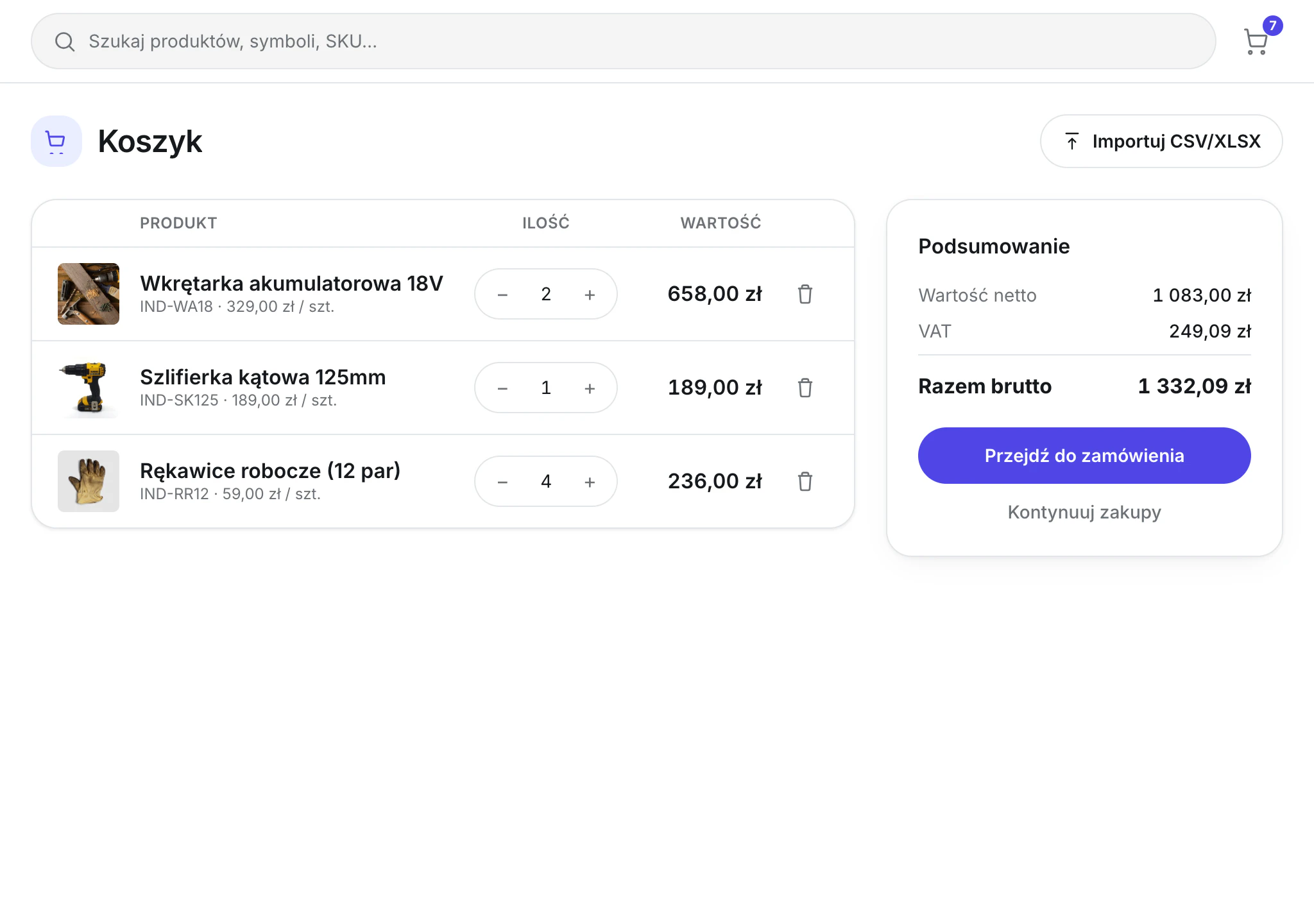
The customer uploads a list of lines from CSV or XLSX and sees the net value, VAT and total at once. An order prepared in their own system comes across without retyping.

  • CSV and XLSX import
  • Net, VAT and gross summary
  • A regular order is repeated in one click, only the quantities change
Basket with a CSV and XLSX import button and a net, VAT and gross summary
Wholesaler panel

Your sales centre

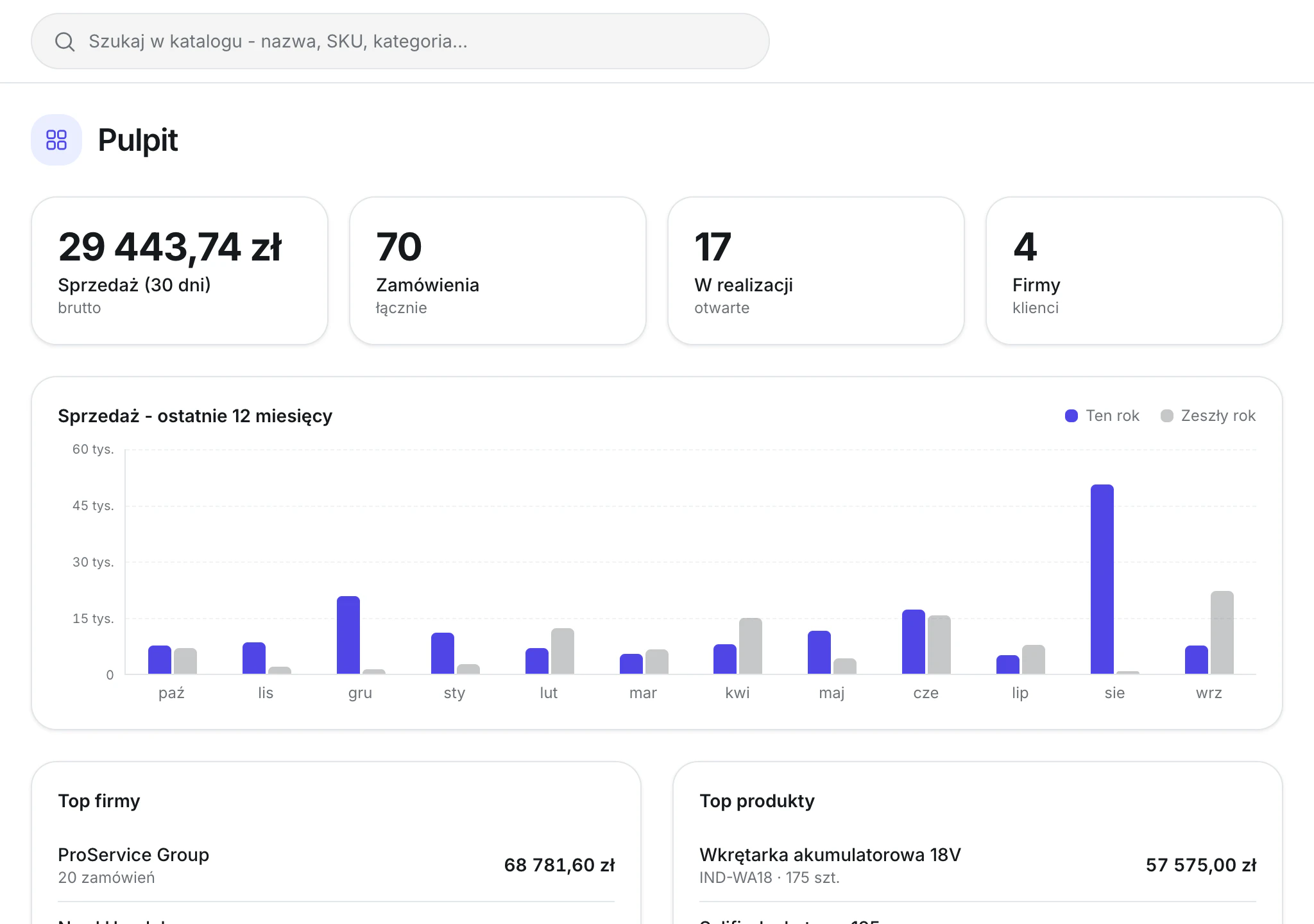
In your own panel you see sales for every month, orders being fulfilled and which customers and products sell best. This is also where you set each company’s discount, credit limit and account manager.

Wholesaler dashboard with a year-on-year sales chart and a customer ranking
  • Sales against last year
  • Top customers and products
  • Discount, limit and manager per company

Possible features

  • Per-customer price lists

    enforced by the system

  • Credit limits and payment terms

    applied automatically

  • Volume discounts and promotions

    applied by value or quantity, right in the cart

  • Repeat orders

    favourite lists and per-customer templates

  • Multi-cart

    orders per branch or on behalf of several customers

  • Approval path

    sales rep → manager → fulfilment

  • Order from a file

    CSV import or a pasted list of codes instead of clicking

  • Two-way ERP integration

    Comarch, SAP, Subiekt and others

  • Order export

    to any accounting system

  • Invoices, statuses and history

    available to the customer without calling a rep

  • Claims raised in the panel

    with the history of every case in one place

  • Status notifications

    sent automatically, with no one writing an email

What changes after go-live?

Before launch

Scaling sales

Twice the orders means almost twice the office work.

Sales reps’ time

A sales rep spends the day retyping orders and quoting prices.

Orders

Customers order when they manage to reach a sales rep.

Errors and corrections

A retyping mistake comes back as a complaint or an invoice correction.

Receivables

An exceeded credit limit shows up after the goods have shipped.

More sales mean more retyping

After launch

Scaling sales

More orders and customers add no retyping for the team.

Sales reps’ time

A sales rep has time for new customers and larger deals.

Orders

Customers order when they need to, evenings and weekends included.

Errors and corrections

The order reaches the ERP exactly as the customer placed it.

Receivables

An order over the limit waits for a decision before the goods ship.

The team handles more orders and gains time for customers

Fit the platform to your company

We map every feature to your processes and requirements. The platform can be fitted even to a very complex purchasing process on your customers’ side.

Our most recent build of a similar project

A B2B panel for an electronics distributor - 17% more orders and 80% faster handling

Over 30 customers order in the panel at any hour, each with their own price list and credit limit. Prices and stock for over 8,000 items from five manufacturers flow into the catalog automatically.

See the case study

„I got a B2B system tailored to the way we work, not the other way round. The team does not fight the tool, and orders move faster.”

Rafał AntolakV-ce CEO · iBox
See it before you order it

A sample B2B platform to click through

A demo with a tools catalogue, customer price lists and a wholesaler panel. You sign in as a customer or as the wholesaler.

Implementation step by step

  1. We map your process and your needs

    We sit down with the people who handle orders today and write down where prices come from and who approves limits.

  2. You get a finished plan

    A written scope with the order of work, the list of integrations and the dependencies between them. You know what gets built, in what order and what each step needs.

  3. The build

    You get everything in stages. Each one ends with a working part of the system that matches the order and what we built together in the workshops.

  4. Support after launch

    After launch we monitor the system and oversee how the infrastructure runs. The code and the data belong to you from day one.

Common questions before you start

We do not have a finished product you have to bend your company around. We build around how your sales actually work: who gets which price, how limits and approvals run, what still goes through a phone call or an email. Your tools stay where they are - ERP, warehouse and accounting get connected to the platform, and when one of them is missing a function, we add it instead of replacing the whole system.

Integrations first: ERP, warehouse system, payments. Then data migration, number of warehouses, number of languages, and how unusual your pricing policy is. We quote after a call, once we know these.

A catalog export or even a fragment, a description of how your price lists and discounts work, a list of systems to integrate, and rough volumes: how many customers, how many orders per month. Bring that to the call and you leave with a real quote.

You decide. We can stay for maintenance and development, or hand the project to your team or another vendor - the code, documentation and environments are yours from day one.

Yes, and that is the assumption from the start. The project runs on Laravel and Lunar - a standard PHP stack with a large talent pool. The code lands in your repository, with no closed components and nothing that only works on our machines. A developer who knows Laravel joins the project without training from us.

The engine is MIT-licensed, so there are no licence fees and no revenue share - unlike platforms where the bill grows with your sales. What remains is hosting and as much maintenance as you choose to buy. The scope of support is agreed separately and you can drop it without losing access to the system.

Let's talk about your project.

On a short call I will tell you where to start and what it may cost.

Kuba Szcześniak
Kuba Szcześniak
Founder · Lead engineer
On the call you'll learn:
  • what the solution costs
  • how we can solve your problems
  • where we start and what the next steps are
Quick quote